


Wuuk
3.8222.00 Reviews
App Specs
- Version
- 4.2.5
- Updated On
- License
- Free
- Downloads
- 100,000+
- Developer
- Wuuk Labs
- Categories
- House & Home
- Platform
- Android
Screenshots
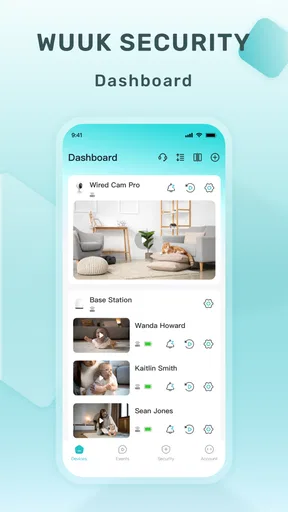
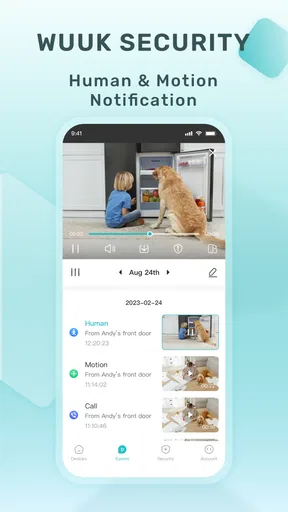
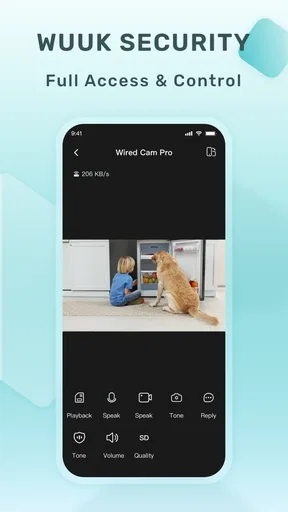
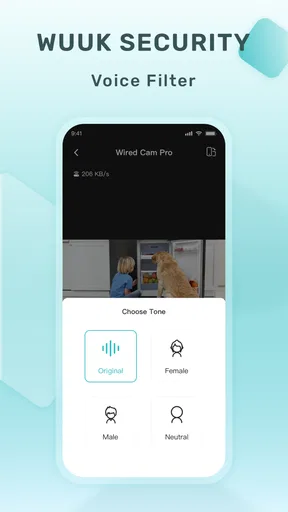
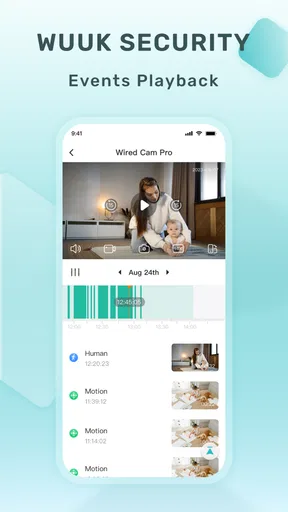
 Analysis by AppCompare
I think the most useful way to judge Wuuk is to ask whether you already have, or plan to use, devices from Wuuk Labs. It’s a free home app for bringing those devices together, rather than a general-purpose control center for every smart-home brand. That distinction matters: if your household is built around Wuuk equipment, a single place to check in can feel practical; if you want one app to manage a mix of unrelated products, this is probably not the starting point I’d choose.
Start with the devices you actually own
Before installing it, I’d make a quick list of what you want to manage and check that the relevant devices are part of the Wuuk family. The app’s purpose is to connect with Wuuk devices, so the value depends less on how many settings it has and more on whether it fits the equipment in your home. That’s a more helpful decision test than downloading it first and hoping it will serve as a universal smart-home remote.
This also affects how I’d think about setup. If you’re adding a Wuuk device for the first time, the app gives you a place to pair and access it. If you’re only curious about the software and don’t have compatible hardware, there may be little to do after opening it. I’d treat the app and the devices as parts of one setup, not as two independent purchases.
Where a dedicated hub is useful
A focused app can be easier to live with than a crowded collection of controls. When your household uses compatible Wuuk products, having their access and controls gathered in one place can save the small effort of remembering which app handles which device. The benefit is especially clear for someone who checks home equipment in short bursts rather than spending time building elaborate automations.
For example, imagine leaving home in the morning and wanting to check a device before heading into work. A dedicated hub gives you a clear place to start. Later, if a household member needs to use the same device, it’s useful to have a familiar app rather than a separate control method for every piece of equipment. I’d still make sure anyone who needs access can complete the setup and understand the controls before relying on it in a hurry.
What it is—and what it isn’t
The usual alternatives fall into a few broad groups: each device’s own companion app, a platform designed to coordinate products from different makers, or physical controls that don’t rely on a phone. Wuuk’s appeal is the dedicated route. It is a sensible fit when the devices you want to access are from Wuuk Labs, but a broader smart-home platform may suit you better if you already own a varied collection and want a single interface across brands.
That trade-off is worth considering before you build around any one manufacturer. A dedicated app can keep the experience more focused, while a multi-brand platform may reduce the number of apps you use across a mixed home. Neither approach is automatically better: the right choice depends on whether you value a direct connection to one maker’s devices or wider compatibility across your existing equipment.
Worth Reading Before You Choose

EA SPORTS FC Mobile 26 Is a Bigger Football Game, but It Takes Time

Flipboard Shows What News Apps Must Do Beyond the Feed

Switching to Android Auto Means Rethinking Your Driving Routine

Google Calendar Makes a Crowded Week Easier to Manage

Ludo King Makes the Most of the Minutes Between Plans

Baby Panda World Brings Quick Play to Modern Phones, but Its Game Library Feels Busy
Check the practical costs before committing
The app itself is free, but that does not mean every part of using a connected-home setup is cost-free. Wuuk has in-app purchases ranging from $3.99 to $294.99 per item. Those prices make it sensible to check what a purchase applies to and whether it matches the way you plan to use your devices, rather than assuming the download includes every paid option.
There’s also a small but important switching cost: once you have paired devices and made the app part of your household routine, moving to a different brand or control platform may mean learning a new setup and changing how everyone accesses things. I wouldn’t buy hardware just because its companion app sounds convenient. First decide whether the devices themselves suit your home, then consider whether this app makes managing them straightforward enough.
Setting Up Wuuk: A Breeze or a Blunder?
First things first, setting up Wuuk is surprisingly straightforward. I downloaded it from the app store and within minutes, I was ready to go. The app guides you through the process with clear instructions, and before you know it, you've got your home security system at your fingertips.
The initial setup includes pairing your Wuuk devices with the app. I found this part really intuitive, thanks to the step-by-step guide provided. If you’re not super tech-savvy, don’t worry. The app makes it easy for anyone to get started.
Features That Stand Out
Now, let's talk about what you can actually do with Wuuk. The app offers a variety of features that make home security convenient and efficient. One of my favorites is the real-time video feed. It’s like having a live broadcast of your front porch right on your phone. I mean, how cool is that?
Another standout feature is the motion detection alerts. Whenever there's any activity, I get a notification. It’s comforting to know that if someone’s lurking around, I’ll be the first to know. Plus, the app allows me to customize the sensitivity of these alerts, so I don’t get pinged every time a squirrel runs by.
Usability: Smooth Sailing or Rough Waters?
Using Wuuk on a daily basis is a breeze. The interface is clean and user-friendly, making navigation a piece of cake. Whether you’re checking the camera feed, adjusting settings, or reviewing past alerts, everything is just a tap away. I especially appreciate the two-way audio feature, which lets me chat with anyone at my door, even if I’m miles away.
One thing I noticed was that the app occasionally lags when loading video feeds. It’s not a deal-breaker, but it’s worth mentioning if you’re someone who demands instant access at all times.
Security and Privacy: Can You Sleep Easy?
When it comes to security apps, privacy is a big concern. Wuuk encrypts all your data, ensuring that your video feeds and personal information are safe from prying eyes. I did a little digging, and it seems Wuuk takes privacy seriously, which is a relief given the nature of the app.
However, like any app, it's crucial to stay updated on their privacy policy and terms of service. The digital world is ever-changing, and knowing what you're signing up for is important.
Living with alerts and video
For me, motion alerts are most useful when they answer a specific question: did someone arrive, and is there anything I need to do? Sensitivity controls help make that stream more manageable. I’d start conservatively, then adjust after seeing what produces unnecessary notifications around your home. The right setting depends on the camera’s location and the activity nearby, so a little tuning is more useful than leaving alerts at a level that quickly becomes noise.
Video is similarly best treated as a check-in tool, not a guarantee of instant access. Since I’ve encountered occasional loading delays, I wouldn’t make a time-sensitive decision depend on the feed opening immediately. If you’re expecting a delivery or waiting for someone, check ahead when possible; for routine reassurance, the live view and alerts still have value even when they aren’t instantaneous.
Two-way audio has a practical role beyond greeting a visitor. It can help you ask someone at the door to wait while you get to it, or clarify why they’ve stopped by without being home. I’d test the sound and your usual way of speaking through it before relying on it, since a feature is only helpful if both sides can understand one another in the moment.
Who will appreciate it most?
I’d recommend considering Wuuk if you already use compatible devices, prefer a dedicated app, and want straightforward access to video, alerts, and device controls. It can also suit a household where one person handles setup but other people need a simple routine for checking what is happening. A short walkthrough for everyone who uses it can prevent confusion when an alert arrives or someone needs to check the feed.
I’d skip it if your main goal is to control products from several manufacturers in one place, or if you don’t own Wuuk equipment and have no reason to add it. People who need consistently immediate video access may also want to test the experience carefully before relying on it, given the lag I noticed. In those situations, a broader platform or a different device ecosystem may be a better match than choosing this app first.
Compatibility, price, and everyday expectations
On Android, the current version is 4.2.5 and the minimum operating system requirement is Android 5.1. The app is rated for Everyone, and it has been available since June 23, 2020. It has a 3.9 average from 708 ratings, with 212 written reviews, and has passed 50K+ installs. I see those figures as a useful snapshot of its audience, not a substitute for checking whether the Wuuk devices you want to use are right for your household.
Because the app is free to install while optional purchases can carry substantial costs, I’d separate the software decision from any hardware or paid-feature decision. Look at the purchase prompt carefully before confirming, and consider who in your household will use the feature. That simple pause helps avoid paying for something that doesn’t solve a real problem in your routine.
Final Thoughts: Is Wuuk Worth It?
So, after giving Wuuk a spin, would I recommend it? Absolutely, especially if you’re looking for an affordable and efficient way to boost your home security. It offers a solid range of features, from live video feeds to motion alerts, all while keeping things simple and user-friendly.
Of course, it’s not perfect. The occasional lag and the need to keep an eye on their privacy updates are minor drawbacks. But overall, the peace of mind that comes with having an extra layer of security is worth it. If you’re in the market for a home security app, give Wuuk a try—you might just find it’s exactly what you need.
Pros
- User-friendly interface design.
- High-quality video streaming.
- Wide range of customization options.
- Responsive customer support.
- Frequent updates and improvements.
Cons
- Limited free features available.
- Requires stable internet connection.
- Notifications can be delayed.
- Occasional app freezes reported.
- Subscription can be pricey.
FAQs for Wuuk
What is Wuuk and what does it offer?
Wuuk is a feature-rich security app designed to enhance home safety through smart technology. It offers a range of products including video doorbells and security cameras, all integrated within a user-friendly mobile app. The app provides real-time alerts, live streaming, and cloud storage options to ensure comprehensive home surveillance.
Is the Wuuk app compatible with both Android and iOS devices?
Yes, the Wuuk app is compatible with both Android and iOS devices. It supports a wide range of smartphones and tablets, allowing users to monitor their security systems remotely. You can download the app from the Google Play Store or Apple App Store to get started with your Wuuk devices.
How secure is the data collected by Wuuk devices?
Wuuk prioritizes user privacy and data security by implementing advanced encryption methods to protect data transmitted between devices and the cloud. Users can opt for additional security features like two-factor authentication to safeguard their accounts, ensuring that all video feeds and alerts remain confidential and secure.
What kind of subscription plans does Wuuk offer for cloud storage?
Wuuk offers several subscription plans for cloud storage, ranging from basic to premium options. These plans vary in terms of storage capacity and access duration for recorded footage. Users can select a plan that best fits their needs, with the flexibility to upgrade or cancel at any time without penalties.
Does Wuuk support integration with other smart home systems?
Yes, Wuuk supports integration with popular smart home systems such as Amazon Alexa and Google Assistant. This allows users to control their devices through voice commands and create a seamless smart home experience. Integration features enable automation and enhanced control over your Wuuk devices.


